<html>
<head>
<meta http-equiv="Content-Type" content="text/html; charset=BIG5">
<title>第一支javaScript</title>
</head>
<body>
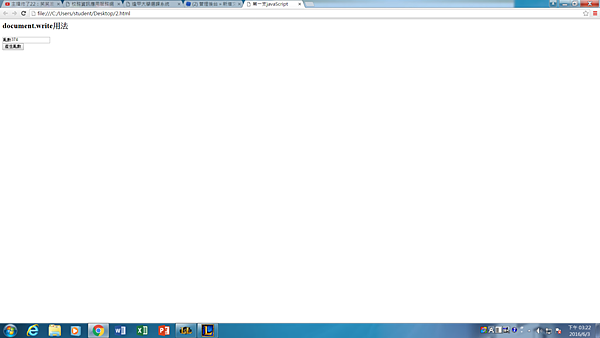
<h2>document.write用法</h2>
 <Script type ="text/javascript">
function add() {
var a,b,c,maxNum,minNum;
maxNum = 9;
minNum = 0;
 a= Math.floor( Math.random() * (maxNum - minNum + 1) ) + minNum;
do{
         var exist = true;
         b= Math.floor( Math.random() * (maxNum - minNum + 1) ) + minNum; 
        if(b != a) exist = false;   
    }while (exist);    
 do{
           var exist = true;
           c= Math.floor( Math.random() * (maxNum - minNum + 1) ) + minNum;
          if(c != b && c != a) exist = false;
      }while (exist);
  document.getElementById('c3').value ="亂數"+a+b+c;
}
 </Script>
   <input type="text" name="address" id="c3" <br></br>
   <input type="button" value="產生亂數" onclick="add()"/>
</body>
</html>

harry123168 發表在 痞客邦 留言(0) 人氣()


<html>
  <head>
    <script type="text/javascript" src="https://www.gstatic.com/charts/loader.js"></script>
    <script type="text/javascript">
var a,b,c
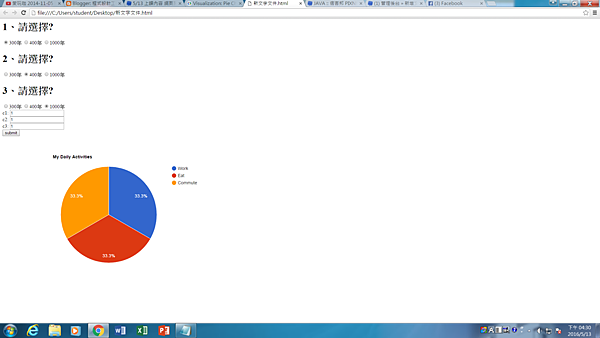
var a1,a2,a3,a4;

harry123168 發表在 痞客邦 留言(0) 人氣()


<html>
  <head>
    <script type="text/javascript" src="https://www.gstatic.com/charts/loader.js"></script>
    <script type="text/javascript">
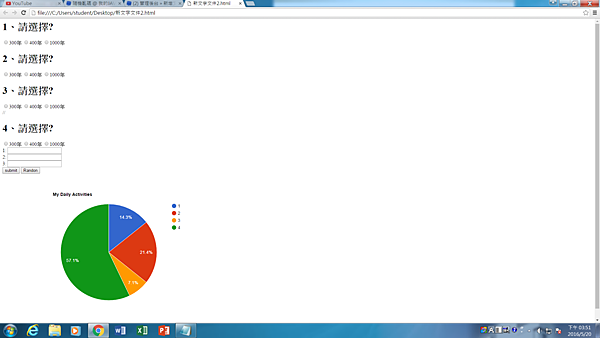
    google.charts.load('current', {'packages':['corechart']});
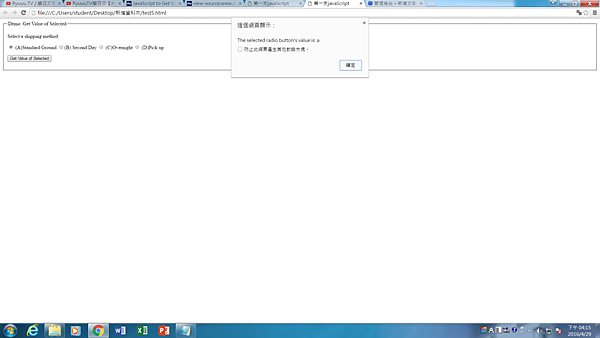
      google.charts.setOnLoadCallback(drawChart);

harry123168 發表在 痞客邦 留言(0) 人氣()

20160506_144617.jpg
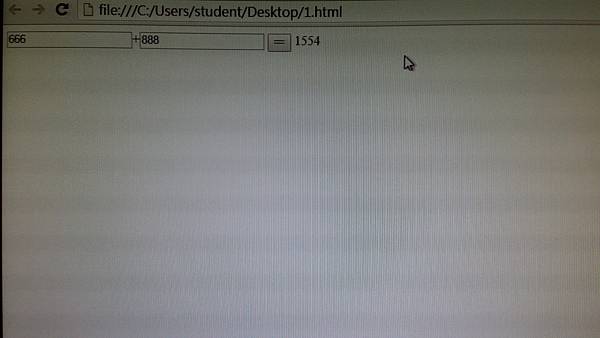
程式一

<html >


<head>


<title>加法運算器</title>


<script>


function add() {


var a = parseInt(document.getElementById('a').value);


var b = parseInt(document.getElementById('b').value);


document.getElementById('result').value = a+b ;


}


</script>


</head>


<body>


<input id="a" type="text" />+<input id="b" type="text" />


<button onclick="add()" ></button>


<output id="result"></output>


</body>


</html>

harry123168 發表在 痞客邦 留言(0) 人氣()


<html>
<head>
<meta http-equiv="Content-Type" content="text/html; charset=BIG5">
<title>第一支javaScript</title>
</head>
<body>

harry123168 發表在 痞客邦 留言(0) 人氣()

20160422_155712
Android Studio 下載與安裝
Android Studio 啟動與設定

harry123168 發表在 痞客邦 留言(0) 人氣()

https://z58134g.blogspot.tw./
https://drive.google.com/folderview?id=0B961WZvILJrgb1g1M3JHQkxOZms&usp=sharing

harry123168 發表在 痞客邦 留言(0) 人氣()


隨著行動裝置的興起,智慧型手機(SmartPhone)成為人們生活中不可缺的東西


不論你是要聊天社交、查詢資料、玩遊戲、聽音樂


都可以在手機上一鍵搞定,APP讓生活變得更便利


今天就來介紹ANDROID的程式開發入門


一步一步的帶各位寫第一支APP程式


要開發ANDROID手機程式


硬體方面,你需要一台電腦和一支Android手機


手機最好是HTC或SONY這種大廠牌,才不會有找不到驅動程式(Driver)的困擾


購買手機前,可以到手機商的官網,看看有沒有提供驅動程式下載


軟體方面:你需要下載3樣東西


1. JAVA開發工具(Java Development kit - JDK)


2. Eclipse的JAVA開發環境(Eclipse IDE for Java Developers)


3. Android 開發工具(stand-alone Android SDK)


※ 各程式下載最新版即可


※ 有時候安裝不成功,不是你的問題,是程式的問題,請等官方解決


1.  JAVA開發工具(Java Development kit - JDK)


https://www.oracle.com/technetwork/java/javase/downloads/index.html


JAVA開發工具


下載JAVA Platform(JDK)後安裝


點選接受條款(Accept License Agreement)後


選擇符合你的作業系統來下載


2. Eclipse的JAVA開發環境   (Eclipse IDE for Java Developers)


 https://www.eclipse.org/downloads/


選Eclipse IDE for Java Developers


下載Eclipse,解壓縮後開啟Eclipse


執行資料夾中/eclipse/eclipse.exe


開啟後,畫面中間上方的選項


Help → Install New Software(安裝新軟體)


在Work with的欄位輸入https://dl-ssl.google.com/android/eclipse後按Enter


會出現Developer tools,勾選後按Next


同意條款後按Finish,就會開始下載


3. 下載Android 開發工具(stand-alone Android SDK)


https://developer.android.com/sdk/index.html


網頁打開後拉到最下面SDK Tools Only


下載 Android 的SDK


同意條款後下載


安裝時,會去抓你之前下載的JDK


如果抓不到JDK的位置,要設定環境變數;抓得到的人,可跳過此步驟


控制台 → 系統 → 進階系統設定 → 進階 → 環境變數


新增一個JAVA_HOME


變數值,輸入你安裝JDK的位置


harry123168 發表在 痞客邦 留言(0) 人氣()

20160415_162224.jpg
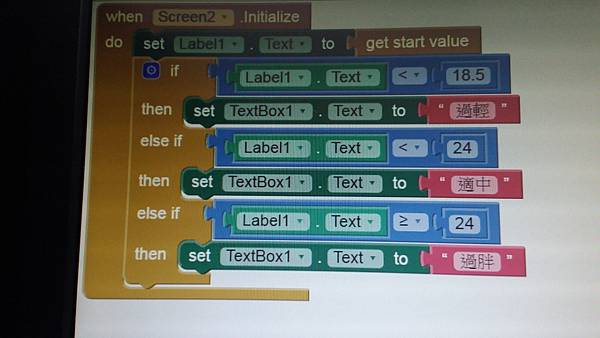
BMI

harry123168 發表在 痞客邦 留言(0) 人氣()

1.先開eclipse


2.

$servername = "localhost";

$username = "root";

$password = "";
$dbname = "test";


// Create connection

$conn = new mysqli($servername, $username, $password, $dbname);

// Check connection

if ($conn->connect_error) {

    die("Connection failed: " . $conn->connect_error);

}


$sql = "SELECT * FROM `user`";


$result = $conn->query($sql);


if ($result != null) {

    // output data of each row

    while($row = $result->fetch_assoc()) {

        echo "id: " . $row["name"]. $row["passwd"]. "<br>";

    }

} else {

    echo "0 results";

}

$conn->close();

?>

harry123168 發表在 痞客邦 留言(0) 人氣()

 
package test;

import java.sql.Connection;

import java.sql.DriverManager;

public class test1 {


public static void main(String[] args) {

// TODO Auto-generated method stub

 Connection c = null;

  try {

   Class.forName("org.sqlite.JDBC");

   c = DriverManager.getConnection("jdbc:sqlite:test.db");

  } catch (Exception e) {

   System.err.println(e.getClass().getName() + ": " + e.getMessage());

   System.exit(0);

  }

  System.out.println("Opened database successfully");

 }

}


harry123168 發表在 痞客邦 留言(0) 人氣()

1
Blog Stats
⚠️

成人內容提醒

本部落格內容僅限年滿十八歲者瀏覽。
若您未滿十八歲,請立即離開。

已滿十八歲者,亦請勿將內容提供給未成年人士。